YouTube Chapters vs Timestamps: What's the Difference?
If you have been on YouTube for a while, you might use the words "Timestamps" and "Chapters" interchangeably. Technically, they are related, but they are not the same thing. Understanding the difference can help you format your descriptions correctly to maximize viewer engagement.
What are Timestamps?
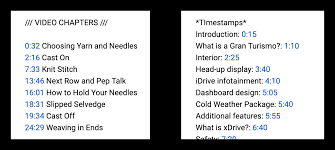
In the traditional sense, a timestamp is simply a time code that links to a specific point in a video.
Example: "3:45 - Review of the camera settings."
If you click that link, the video jumps to 3:45. Its a navigation tool. Creators have been using timestamps in descriptions for years to help viewers skip to the most relevant parts of long videos.
What are YouTube Chapters?
YouTube Chapters are a specific feature launched by YouTube that takes your timestamps and converts them into a structured, segmented playback bar.
The Visual Difference: When you add timestamps correctly, YouTube automatically creates a "Chapters" bar at the top of the progress bar. You can see the segments visually and tap between them.
The Requirement: For timestamps to become "Chapters," you must have at least three timestamps listed starting from 0:00. The first timestamp must be 0:00 and should be labeled as the title of the first segment (e.g., "0:00 Introduction").
The Functional Difference
Timestamps (Old School): These are just links. They help with user navigation but dont change the visual layout of the video player.
Chapters (New Feature): These reorganize the video progress bar. Viewers can swipe left/right on the app to skip chapters, and they can see the chapter titles on the screen. This is a much more interactive experience.
Which One is Better for SEO?
You need both, but technically, you need timestamps to get chapters.
If you just list random timestamps in your description (e.g., "Watch this: 4:30, Watch that: 12:15"), you are providing navigation, but you are missing out on the enhanced user experience.
If you format your timestamps correctly (Starting with 0:00 and including at least 3), YouTube automatically upgrades them to Chapters. This gives you the visual playback bar, which keeps users on the video longer.
The Bottom Line
Timestamps are the raw data; Chapters are the finished product. To ensure your videos get the upgraded chapter feature, always format your timestamps in a list starting with 0:00.
Creating these lists manually can be tedious. By using a transcript-to-timestamp generator like [Your Tool Name], you ensure your formatting is perfect every time, guaranteeing that your videos get the chapters feature.